


Building your first DJ setup doesn’t have to mean buying separate decks, a mixer and an expensive sound system. A carefully chosen controller or standalone unit, paired with headphones and speakers, can give you a practical setup with plenty of room to improve.
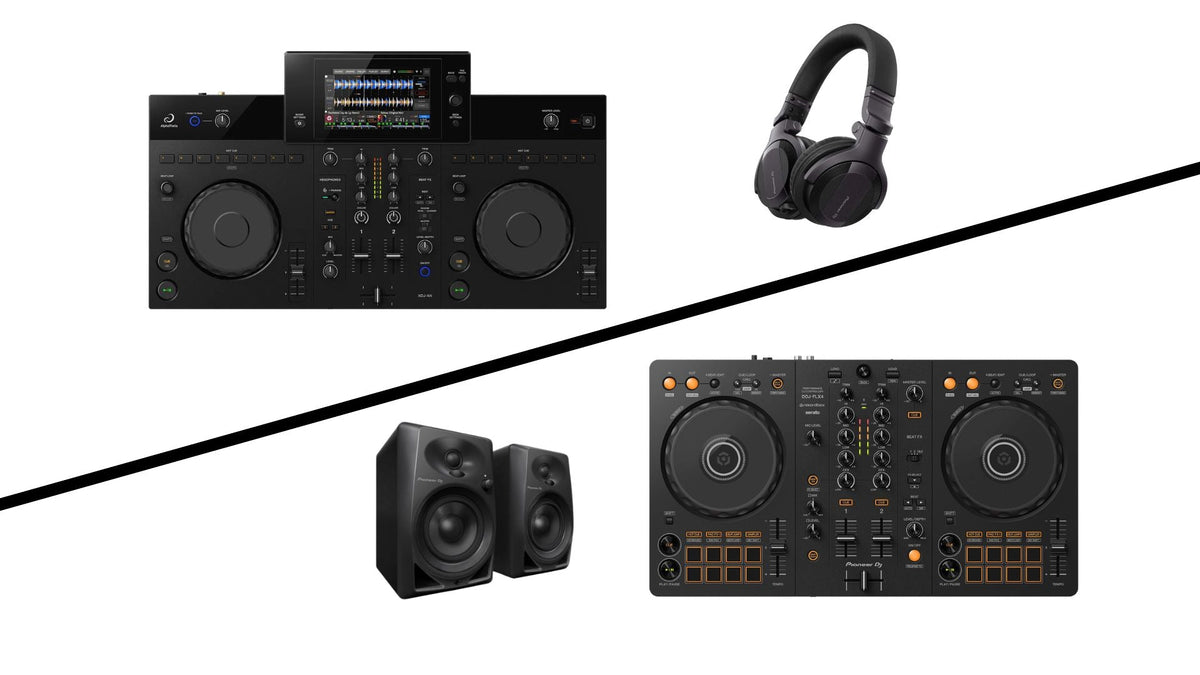
Two options worth considering are the Pioneer DJ DDJ-FLX4 and AlphaTheta XDJ-AN. The DDJ-FLX4 suits beginners who want a straightforward but capable controller for use with a computer or compatible mobile device. The XDJ-AN suits those who prefer a standalone system with its own screen and direct streaming options. In our opinion, both options offer a great introduction to DJing.
Here’s how to choose—and what else you’ll need.
1. Choose a DJ Controller or Standalone System
The first decision is how you want to access and play your music.
A DJ controller works with software on a connected computer or mobile device. You use its physical controls to mix while the software handles playback.
A standalone DJ system can play music without a connected laptop. Its built-in screen and playback functions let you browse and mix directly on the equipment.
Both approaches teach the same essential skills: choosing tracks, cueing, matching timing, balancing levels and building transitions.
2. DDJ-FLX4: A Simple Start with Room to Grow
The Pioneer DJ DDJ-FLX4 is our suggested starting point if you want accessible controls without quickly running out of things to learn.
Its familiar Pioneer DJ layout helps you practise the fundamentals, while Smart Fader and Smart CFX provide assistance with transitions and effects. You can experiment with those tools as you develop confidence, then spend more time refining your manual mixing.
The FLX4 works with rekordbox and Serato DJ Lite on compatible computers. Supported mobile setups provide another option, although you should check your device, connection and power requirements before buying.
The important distinction: the FLX4 needs a connected device running DJ software. It does not play USB music independently.
A practical FLX4 starter setup
Our DDJ-FLX4 Beginner DJ Package brings together:
-
Pioneer DJ DDJ-FLX4 controller
-
Pioneer DJ HDJ-CUE1 headphones
-
A pair of Pioneer DJ DM-40D monitor speakers
-
An RCA cable
Add your compatible computer or mobile device, supported software and music, and you have the core equipment for learning at home.
3. XDJ-AN: Standalone Mixing with Streaming Options
If you would rather keep a laptop out of your performance setup, consider the AlphaTheta XDJ-AN.
This two-channel all-in-one system combines a 7-inch touchscreen with USB playback, built-in Wi-Fi and direct access to supported streaming services. You can browse and mix from the unit itself.
Supported streaming options include Apple Music, Beatport Streaming, Spotify and TIDAL. Availability depends on your region, subscription and supported firmware.
For USB playback, prepare your library in the OneLibrary format using compatible software. The older Device Library format is not supported, so check existing rekordbox exports before using them.
Who should choose the XDJ-AN?
We would suggest it if you:
-
Prefer a dedicated screen and controls for browsing music.
-
Want direct streaming access without a connected laptop.
-
Plan to practise a standalone USB workflow.
-
Have the budget for the system alongside headphones and speakers.
Standalone means you can perform without a laptop; a computer may still be useful for organising music and preparing USB libraries.
4. Add DJ Headphones
Headphones let you listen to the next track before your audience hears it. This is called cueing, and it helps you check your starting point, timing and levels.
You don’t need to begin with the most expensive pair. Prioritise comfort, a useful fit and a suitable connection for your equipment.
The Pioneer DJ HDJ-CUE1 headphones included in our FLX4 package provide a straightforward starting option. Wired headphones also keep the setup simple when you are learning.
5. Choose Speakers for Your Practice Space
For a bedroom or small home practice area, start with a suitable pair of powered desktop speakers. Powered speakers have amplification built in, avoiding the need for a separate amplifier.
Our FLX4 package includes Pioneer DJ DM-40D monitor speakers for this purpose.
Choose speakers for the room where you will practise. A home setup does not need to fill a venue, and equipment suitable for your desk may not be suitable for entertaining a room full of guests.
Before buying cables, check the outputs on your DJ equipment and the inputs on your speakers.
6. Plan Where Your Music Will Come From
You can build your setup around purchased music files, supported streaming services or a combination of both.
Purchased music files let you build and organise your own collection. Prepared local music also reduces your reliance on an internet connection during practice.
Streaming can make it easier to explore music and experiment with different styles. However, the service must work with your chosen software or standalone system, and the appropriate subscription may cost extra.
Don’t assume that a normal listening subscription includes every DJ feature. Check the required plan, available tracks and recording restrictions before subscribing.
A small collection of tracks you know well is enough to begin learning. Familiarity makes it easier to hear when a phrase changes and decide where a transition should start.
7. Budget for the Whole Setup
Before placing your order, check that you have:
-
A controller or standalone DJ system
-
Compatible headphones
-
Suitable speakers and audio cables
-
A supported computer or mobile device if your setup requires one
-
Any necessary power supplies, USB cables or adapters
-
Music and any required subscriptions
-
A stable surface with space for the equipment
An existing compatible laptop can make the FLX4 route especially practical. If you would otherwise need to buy a computer, compare the total setup cost with a standalone option.
Which First DJ Setup Should You Choose?
Choose the DDJ-FLX4 if you want a capable introduction to DJing and are happy to use a computer or compatible mobile device. It gives you the controls to learn properly without making your first setup unnecessarily complicated.
Choose the XDJ-AN if you want standalone performance, a built-in touchscreen and direct streaming options. It is worth considering when avoiding a connected laptop is a priority.
Whichever you choose, regular practice matters more than having every feature on day one.
Get Started with Deck Converters
We can help you choose between a controller and standalone setup, check connections and put together the equipment you need.
Explore our DDJ-FLX4 Beginner DJ Package, ask us about the AlphaTheta XDJ-AN, or contact Deck Converters for advice before ordering.
We also offer DJ lessons at our London location if you would like guidance with your first mixes. Contact us for availability and pricing; lessons are booked separately.
Ready to take the next step? Deck Converters can help you choose the right upgrade and part-exchange your current equipment, making it easy to move to a setup that suits your skills and ambitions.
Share: